Seedream 5.0
ByteDance's Smartest Image Model

Seedream 5.0 ByteDance's Smartest Image Model

Seedream 5.0 reads prompts the way humans do. Compositional intent, multi-subject scenes, text inside images — the fiddly stuff other models get wrong, it gets right.

Features

Why Seedream 5.0

Visual reasoning, not just autocomplete

Seedream 5.0 actually models the scene. Hands, gazes, occlusion, depth cues — the stuff that breaks weaker models stays coherent. Compare it against other generators on the same prompt to see the difference.

Readable text in images

Logo text, signage, packaging copy — 5.0 renders legible characters instead of dream-language. Usable for product mockups and ads. For the best text accuracy, also try GPT Image 2 or the text-in-image editor.

Multi-subject compositions

Two people in a scene, a product on a table, a pet in the foreground — 5.0 keeps all of them coherent, not just the one the prompt emphasized.

Editorial photoreal quality

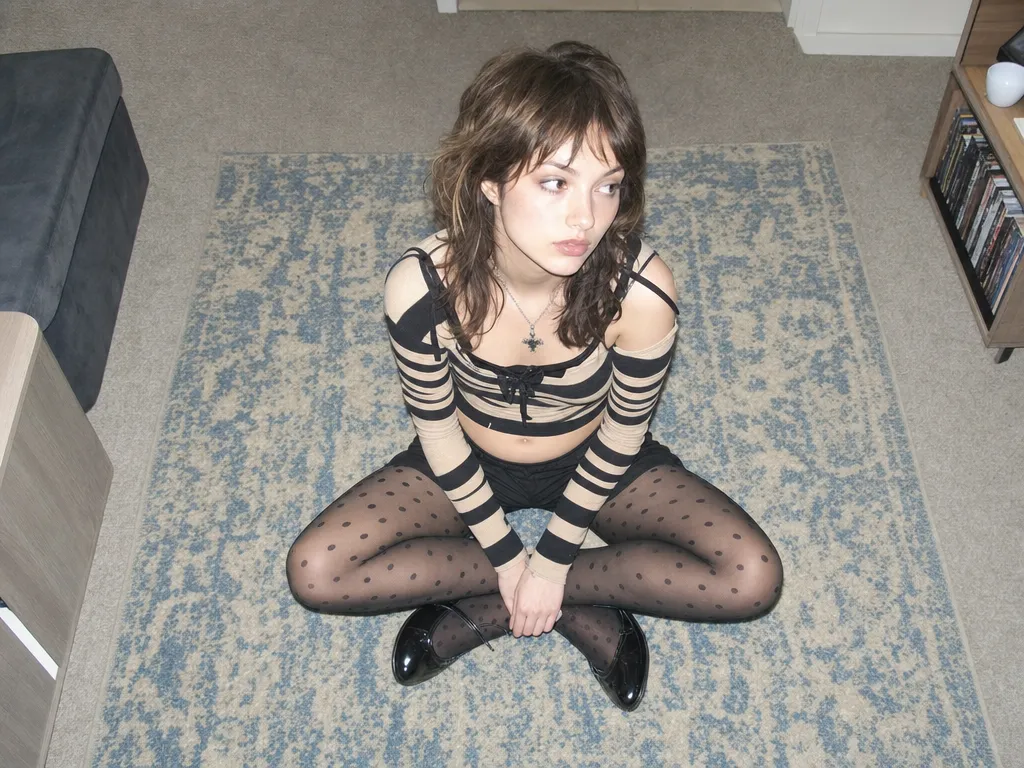
Skin, fabric, and lighting render at a level that competes with shot photography. Fine for magazine layouts, lookbooks, and campaign art — then bring any still to life as video.

Up to 4K native resolution

Seedream 5.0 generates at up to 4K natively — enough for print, large-format displays, and editorial spreads without post-process upscaling. For even higher resolution, chain with the Image Upscale tool.

Reference-based style transfer

Upload a reference image and Seedream 5.0 uses it as a composition or style anchor. Restyle a photo as a watercolor, match a specific lighting setup, or transfer a color palette — all while keeping the original scene intact.

Cost-effective at scale

Seedream 5.0 delivers top-tier quality at a lower credit cost than comparable models. For budget-conscious batch work, drop to Seedream 4.5 for the same editorial look at an even friendlier rate.

Get started

How to use Seedream 5.0

1

Open the AI image generator

Go to Sunra Image and select Seedream 5.0 from the model dropdown. No account required — free daily credits are ready immediately.

2

Describe your scene in detail

Type a prompt describing composition, subjects, lighting, and mood. Seedream 5.0's visual reasoning handles complex multi-subject scenes — describe all the elements and their spatial relationships. Upload a reference image for style transfer or editing.

3

Generate and iterate

Click Generate and review the result. Seedream 5.0's compositional intelligence means adjustments to your prompt produce precise, predictable changes. Try different aspect ratios and styles to explore variations.

4

Download or continue editing

Download your image at up to 4K resolution. Take it further by turning it into a video clip or opening it in Canvas to compare against other models on the same prompt.

Showcase

Made with Seedream 5.0

Who it's for

Use cases

Editorial and magazine photography

Seedream 5.0's photoreal skin, fabric, and lighting quality competes with shot photography. Generate lookbook spreads, cover art, and fashion editorial content without a studio. Pair with AI video generation to bring stills to life.

Product photography with readable labels

Generate e-commerce hero shots, packaging mockups, and catalog images with legible brand text baked in. Seedream 5.0 renders packaging copy and signage accurately — no post-production text overlay needed.

Multi-subject scene composition

Create complex scenes with multiple people, objects, and spatial relationships. Seedream 5.0's visual reasoning keeps every element coherent — hands hold objects correctly, gazes align naturally, depth cues read as real.

Artistic style exploration

Explore watercolor, oil painting, anime, and photorealistic styles from the same prompt. Upload a style reference and Seedream 5.0 transfers it faithfully. Compare results across models on Canvas to find the best match for your project.

Community

Loved by creators worldwide

Join thousands of creators, agencies, and brands who use Sunra every day.

Hands finally look right

I've been generating AI images for 2 years and hands were always the weak point. Seedream 5.0 gets fingers, poses, and occlusion correct about 90% of the time. It's the first model where I don't have to cherry-pick for hand errors.

VP
Vikram Patel
Digital Artist, Freelance

Our lookbook production cost dropped 60%

We generate 80% of our seasonal lookbook images with Seedream 5.0 now. The editorial quality is good enough for our print catalog, and we save roughly $15,000 per season on photography costs.

EP
Elena Popova
Art Director, Fashion Brand

Best multi-subject coherence I've tested

I generate complex family portrait scenes — 4 people, a dog, specific poses and outfits. Seedream 5.0 is the only model that keeps everyone coherent without someone dissolving into the background. Consistently outperforms on our 50-prompt benchmark.

TF
Todd Fisher
AI Product Researcher

Text in images is actually usable

I use Seedream 5.0 for social media quote cards and product label mockups. The text renders legibly about 85% of the time — a massive improvement over what I was getting from other models. Saves me the Canva step entirely.

KB
Kyle Benson
Social Media Content Creator

The visual reasoning is noticeable

I asked for 'a woman handing a book to a child across a table, seen from slightly above.' Every other model I tried broke the spatial relationship. Seedream 5.0 rendered it correctly on the first try. That's genuine scene understanding.

FL
Freya Lindqvist
Computer Vision Engineer

4K output straight to print

We use Seedream 5.0 for restaurant menu photography and in-store signage. The 4K resolution holds up on a 24x36 poster without upscaling. Our print team has stopped asking if images are 'real photos' — they can't tell anymore.

AR
Aaliya Rahman
Marketing Manager, Restaurant Group
FAQ

Questions & answers

How does Seedream 5.0 compare to Nano Banana Pro?
Seedream 5.0 leads on compositional reasoning and readable text. Nano Banana Pro leads on precision edits and prompt-level control for localized changes. Both are first-class for editorial work — see our detailed comparison.
Seedream 5.0 vs Seedream 4.5 — what's the upgrade?
Seedream 4.5 is faster and cheaper per image. Seedream 5.0 adds visual reasoning, better multi-subject coherence, and improved text rendering. Use 4.5 for speed and volume; use 5.0 when composition accuracy and text matter.
Seedream 5.0 vs GPT Image 2 — which is better?
Seedream 5.0 excels at visual reasoning, scene composition, and photoreal textures. GPT Image 2 leads on brand-color accuracy, text rendering, and multi-reference editing. Both are top-tier — pick based on whether you need realism or brand precision.
Can Seedream 5.0 edit an existing image?
Yes. Upload a reference and describe the change — Seedream 5.0 can restyle, recompose, or modify subjects while keeping the look you uploaded.
Is Seedream 5.0 good for product photography?
Yes. Readable packaging text and realistic lighting make it useful for mockups, e-commerce hero shots, and campaign assets. Try it on Sunra's AI image generator.
What resolutions does Seedream 5.0 support?
Up to 4K export. For print and large-format work, 5.0 is usually enough without post-process upscaling.
Is Seedream 5.0 usable commercially?
Yes. Sunra output is licensed for commercial use under our terms of service.
How much does Seedream 5.0 cost on Sunra?
Free daily credits include Seedream 5.0. Heavier usage rolls onto your wallet balance or subscription allowance. No credit card required to start.
Can I turn Seedream 5.0 images into videos?
Yes. After generating an image, click the Image to Video button to animate it using models like Kling 3.0 or Seedance 2.0. The entire workflow stays on Sunra — no downloads or re-uploads.
How does Seedream 5.0 handle complex prompts?
Seedream 5.0 uses visual reasoning to model the full scene — spatial relationships, occlusion, depth cues, and gaze direction. Complex multi-clause prompts with specific compositions land reliably where other models silently drop elements.

Ready to create?

Start with free daily credits. No credit card required.